§2.1 Algorithms
How do we break problems down into steps, represent them formally, and search or sort data efficiently?
Computational thinking is the systematic way of approaching problems so that a computer can solve them. Decomposition breaks a large problem into smaller, more manageable sub-problems. Abstraction strips away irrelevant detail, leaving only what matters for the solution. Algorithmic thinking constructs a clear, step-by-step solution. These three principles appear at every level of computing — from writing a simple function to designing a database system.
Search and sort algorithms are the canonical examples. Binary search is dramatically faster than linear search for large sorted datasets — it halves the search space each step, giving O(log n) behaviour versus O(n) for linear search. Bubble sort is simple but slow (O(n²)); merge sort divides and conquers for O(n log n); insertion sort works well for nearly-sorted data. OCR is the only GCSE board to require all three sort algorithms, and expects students to apply and trace them, not memorise code.
Key algorithm facts
What students must understand
- Decomposition: breaking a problem into smaller sub-problems that can be solved independently
- Abstraction: removing unnecessary detail so the problem can be represented more simply
- Algorithmic thinking: writing a precise sequence of steps that solves the problem
- Identify inputs, processes, and outputs for a problem
- Structure diagrams: show the decomposition of a system as a hierarchy
- Pseudocode: language-independent representation of an algorithm; used in OCR exam
- Flowcharts: six standard OCR symbols (oval=start/end, rectangle=process, diamond=decision, parallelogram=input/output, rounded rectangle=subroutine, arrow=flow)
- Trace tables: track variable values step by step through an algorithm — essential for debugging
- Common errors: syntax errors (breaks the rules of the language) and logic errors (runs but gives wrong output)
- Linear search: simple, works on unsorted data; check each element until found or end reached
- Binary search: fast for sorted lists; find midpoint, compare, discard half the list, repeat
- Bubble sort: repeated passes; swap adjacent pairs if out of order; terminates early if no swaps
- Merge sort: recursively split to single elements, then merge in order; consistently O(n log n)
- Insertion sort: take each element and insert it into its correct position in a growing sorted sub-list
Diagrams
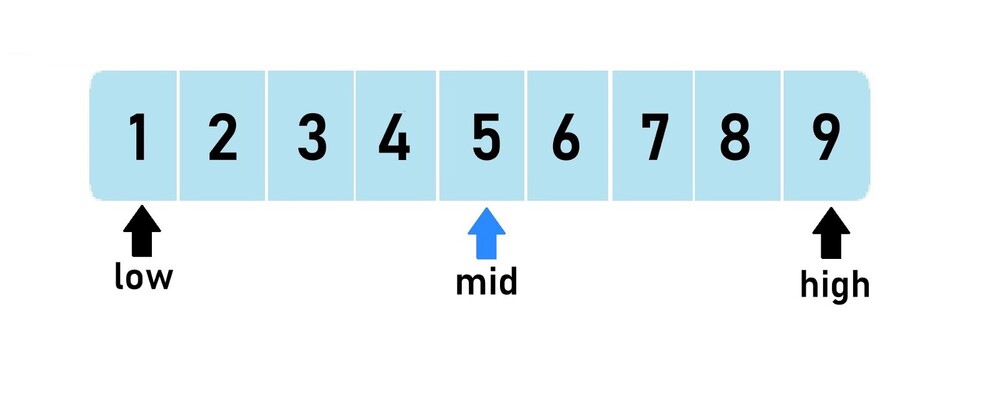
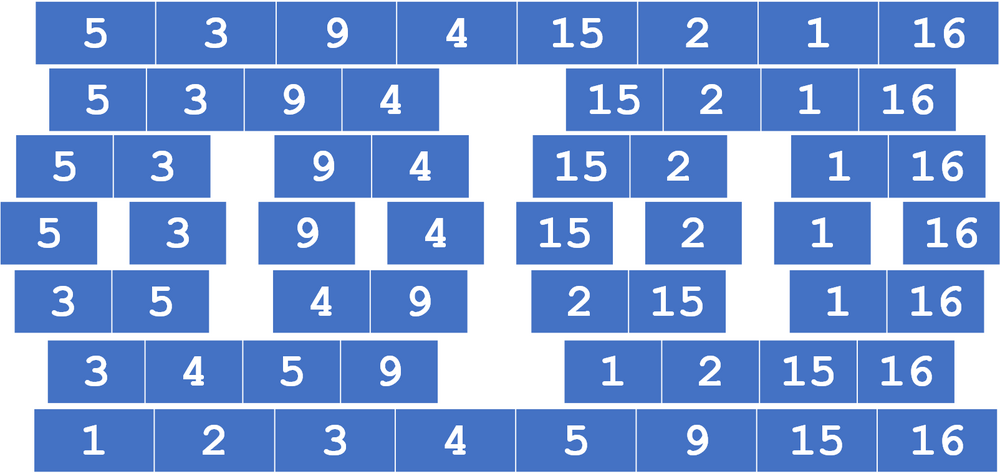
Diagrams: PG Online (Paul Long), OCR J277 textbook. Used under the school site licence.
Linking questions
- How do you implement these algorithms in Python/ERL code? → §2.2 Programming Fundamentals
- How does testing ensure an algorithm produces the correct output? → §2.3 Producing Robust Programs
Practice
- §2.1 Algorithms practice questions — 4 printable question sets from the PG Online textbook pack