Google Spreadsheets
Short clips showing how to handle your practical data in Google Sheets
Average your repeat trials
Find the mean of three trials in one cell, then fill it down for every row.
Click the clip to watch it full screen.
- Click the first empty cell beside your trials.
- Type
=average( - Drag across all three trials, then press Enter.
- Accept the auto-fill to average every row.
- Check: each mean sits between its three trials.
Round your means to match your data
Give every number in a column the same number of decimal places as your measurements: 2 or 3 decimal places.
Click the clip to watch it full screen.
- Select the whole column of means.
- Use the decimal buttons in the toolbar,
.0←and.00→, to set 2 decimal places. - Check: every number in the column has the same number of decimal places, including a final zero such as 6.60.
Divide a value
Turn the time for 5 periods into the time for one period by dividing by 5.
Click the clip to watch it full screen.
- Click the empty cell and type
= - Click the value you want to divide.
- Type
/then the number to divide by, so the cell reads=E4/5 - Press Enter, then accept the auto-fill.
- Set 2 decimal places to match your data.
- Check: multiply one answer back, 1.41 × 5 gives 7.05.
Make a scatter graph
Plot your results against your independent variable, with the independent variable along the x-axis.
Click the clip to watch it full screen.
- Drag down your independent variable, header included.
- Hold Command on a Mac (Ctrl on Windows) and drag your results column.
- Click Insert, then Chart.
- Open the Chart type menu, scroll down and choose Scatter chart.
- Check: one point per row, with your independent variable along the x-axis.
Spread out the x-axis
Widen the x-axis so your points sit in the middle of the graph, clear of the left and right edges.
Click the clip to watch it full screen.
- Open Customise, then Horizontal axis.
- Set the Min. to 0.
- Set the Max. just beyond your largest value: for masses up to 1000 g, use 1200.
- Check: no point sits on the left or right edge.
Spread out the y-axis
Raise the top of the y-axis so your points sit comfortably inside the graph, clear of the top edge.
Click the clip to watch it full screen.
- Open Customise, then Vertical axis.
- Set the Min. to 0.
- Set the Max. above your largest value: for periods up to 1.41 s, use 2.
- Check: your points sit clear of the top.
Give your graph a title
Replace the automatic title with one of your own that names both variables.
Click the clip to watch it full screen.
- Open Customise, then Chart and axis titles.
- Click the title and type your own.
- Check: the title names both variables.
Add a trendline and its equation
Draw the line of best fit through your points and show its equation on the graph.
Click the clip to watch it full screen.
- Click one of your data points. The Series options open.
- Scroll down and tick the Trend line box.
- For a straight-line relationship, keep Type as Linear.
- Under Label, choose Use equation.
- Open Legend and set the font size to 14 so the equation is easy to read.
- Check: the line and its equation appear on your graph.
Analyse your trendline equation
Google Sheets writes the equation of a straight line in its own shorthand. Match it to y = mx + c to find the gradient and the y-intercept.
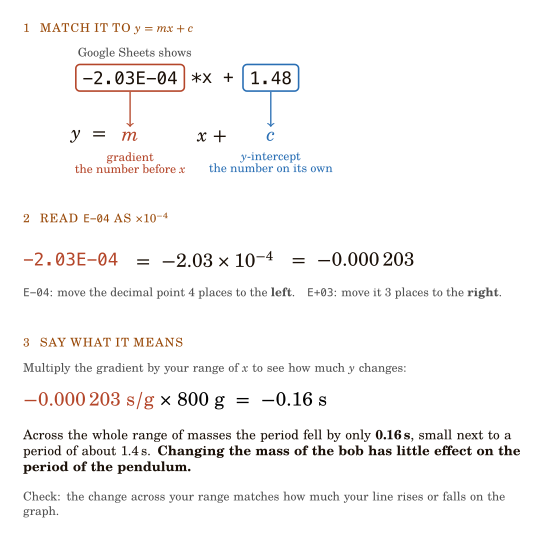
- Find m: the number in front of
*x. - Find c: the number on its own at the end.
- Rewrite any
Enumber as × 10 to that power, then as an ordinary decimal. - Give m its units: the y-axis unit over the x-axis unit, here s/g.
- Multiply m by your range of x to find how much y changes: here −0.000203 s/g × 800 g = −0.16 s.
- Compare that change with your values: 0.16 s is small next to a period of about 1.4 s.
- Check: the change across your range matches how much your line rises or falls on the graph.
Causation: does the independent variable cause a change?
In a fair test you change one variable and keep the others the same. So if the dependent variable changes, the independent variable caused it. Multiply the gradient by your range to see how big that effect is.
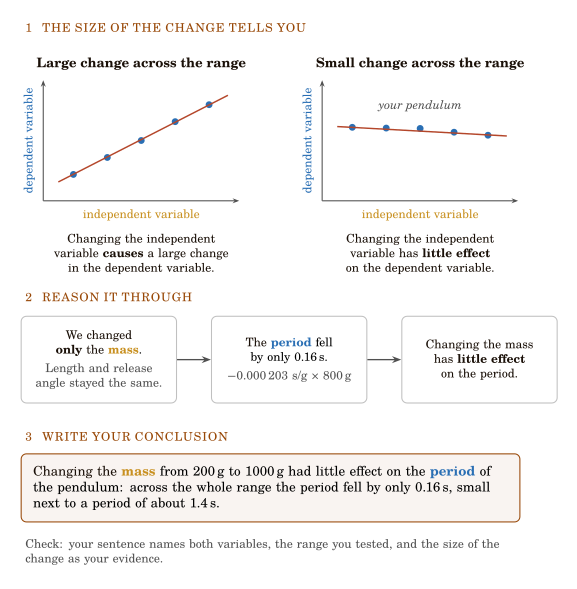
- Multiply the gradient m by your range of the independent variable to find the change in the dependent variable.
- Large change next to your values: changing the independent variable causes a large change in the dependent variable.
- Small change next to your values: changing the independent variable has little effect on the dependent variable.
- Write your conclusion: name both variables, the range you tested, and the size of the change as your evidence.
Correlation: how well do your points fit the line?
The trendline is your best-fit model. Correlation describes how closely your real data points follow it.
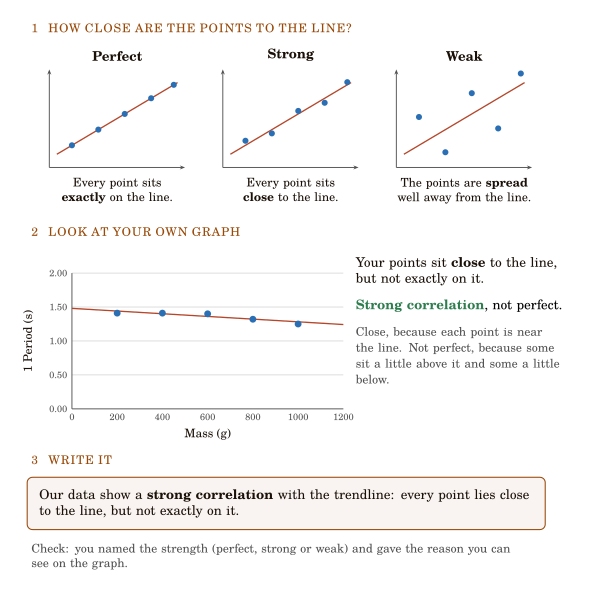
- Look at the gap between each point and the trendline.
- Every point exactly on the line: perfect correlation.
- Every point close to the line: strong correlation.
- Points spread well away from the line: weak correlation.
- Write it: name the strength, then give the reason you can see on your graph.